
Ducky points and draws on your screen
- Works on Mac only
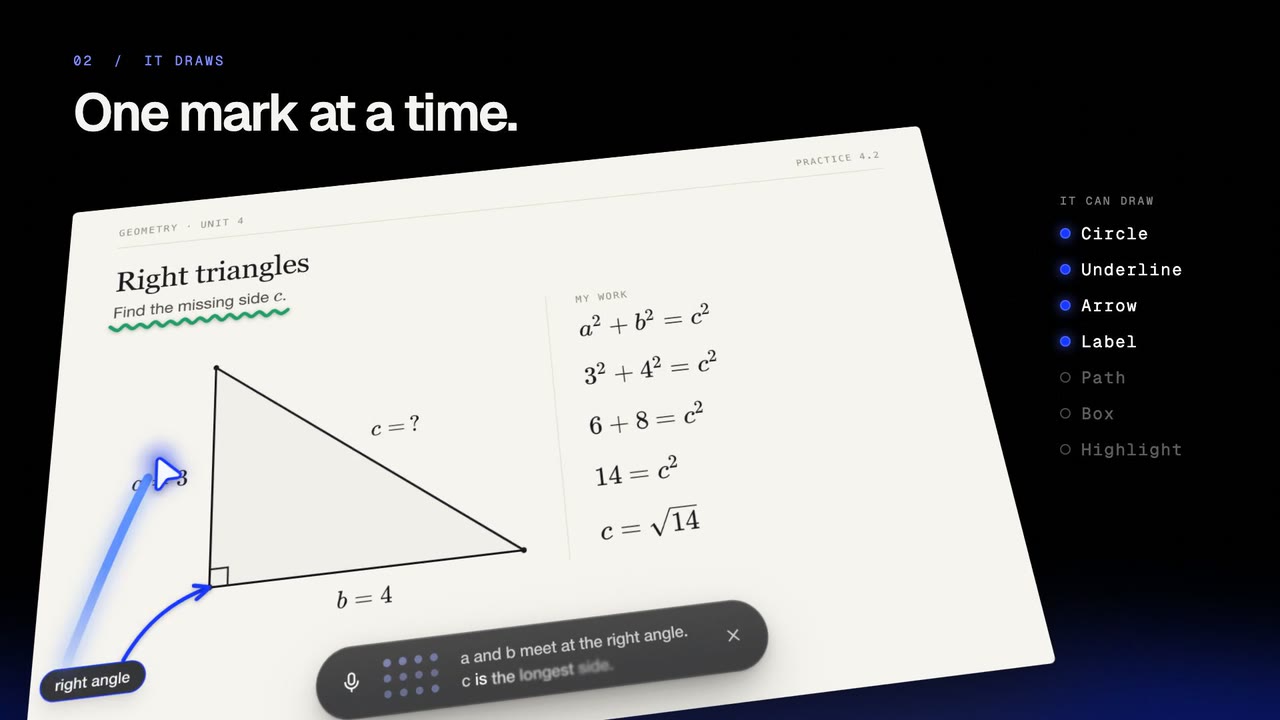
Ducky shows you on your real screen, over any app. A round blue pointer flies to the spot, and marks appear one at a time, like a pen.
Film
Steps#
- Press fn and ask "where is…", "what is this?" or "show me".
- Watch the pointer fly to the spot and label it. It points whenever it says "this".
- Follow the marks: circles, arrows, boxes, highlights, underlines, labels. Walkthroughs are numbered.
- Marks clear when the lesson moves on. Or say "clear the screen".
Spotlight#
On a busy screen, Ducky can dim everything but one part, with a short note. The lit part still works, and the dim lifts at your next click.
Tips#
- Marks stay on what they were drawn on when you scroll.
Limits#
- Marks are only drawn: nothing is clicked. Ducky clicks only when you ask, see Watch me, then you.
- Pointing works on the display with your mouse.
Related#
Something here out of date? Write to support@duckyhelper.com.