
Tasks: plan your week
- Works on Mac only
A clean task list, a planner that fits study around your week, and a tutor that knows what is next.
Film
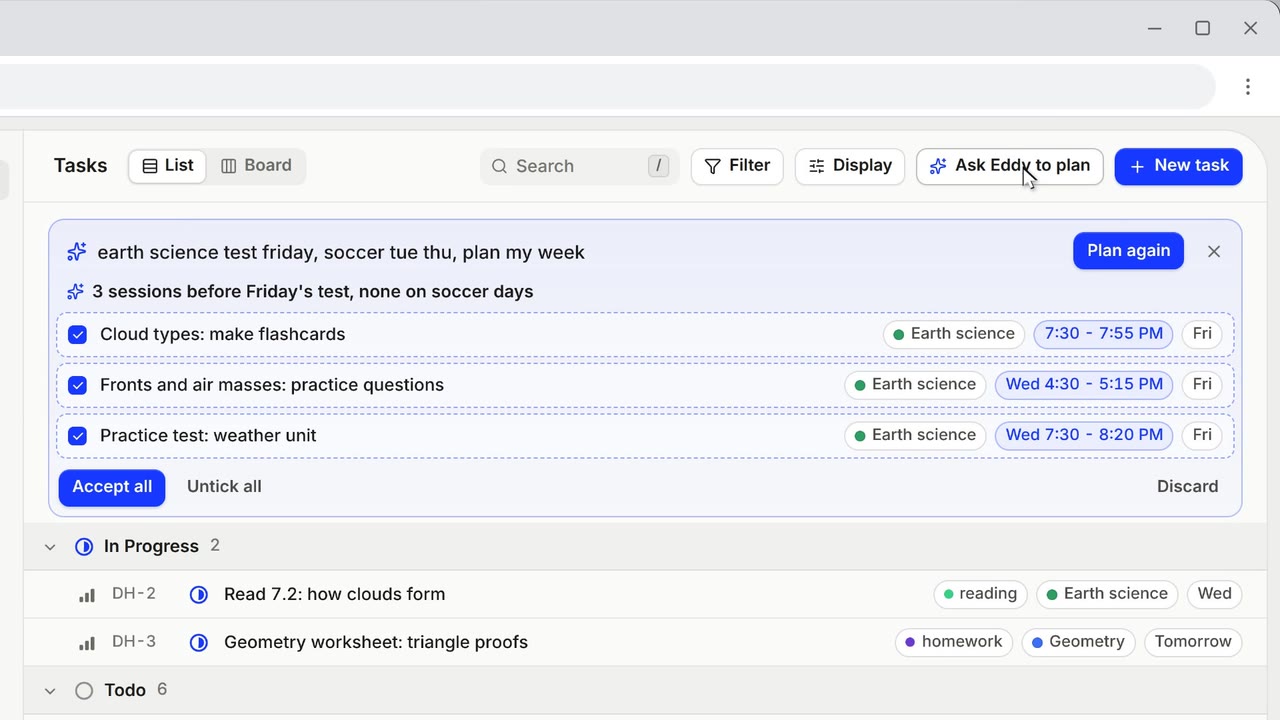
Steps#
- Open Tasks in the sidebar.
- Press C for a new task. Use the List, or the Board and drag tasks between columns.
- Press ✦ Ask Ducky to plan and say your week: "bio test friday, soccer tue/thu, plan my week".
- The plan shows as ticked rows. Untick what you don't want, then add the rest. Nothing is added until you accept.
Keys in Tasks#
| Keys | What it does |
|---|---|
| C | New task. |
| ⌘ K | The command menu. |
| J K | Move through tasks. The arrow keys work too. |
| Enter | Open a task. Esc closes it. |
| S | Status: Backlog, Todo, In progress, Done, Canceled. |
| P | Priority. |
| D | Due date. |
| L | Label. |
| M | Project. |
| X | Select. |
| Delete | Delete, with Undo. |
Eddy knows your schedule#
Ask Eddy "what should I do now?". It reads today's tasks, adds one when you ask (with Undo), drafts a plan you accept, and works on a task with you, logging a note and the minutes.
From a parent or a school paper#
A linked parent can add tasks. A school paper (a syllabus, an assignment sheet, a report card) becomes proposed tasks. Nothing is added until you accept. In Tasks, Add homework from a file opens a file with Eddy.
Tips#
- A task's page takes a description (with Markdown and math), sub-tasks and comments.
- Changes show at once on every device.
Limits#
- Without Plus, Pro and Unlimited, Ask Ducky to plan works a few times a day.
Related#
Something here out of date? Write to support@duckyhelper.com.